Posts

How to check the size of primitive data types in C++

The sizes of variables might be different depending on the compiler and the computer you are using. Following code will produce correct size of various data types on your system. #include <iostream> using namespace std; int main() {    cout << "Size of char : " << sizeof(char) << endl;    cout << "Size of int : " << sizeof(int) << endl;    cout << "Size of short int : " << sizeof(short int) << endl;    cout << "Size of long int : " << sizeof(long int) << endl;    cout << "Size of float : " << sizeof(float) << endl;    cout << "Size of double : " << sizeof(double) << endl;    cout << "Size of wchar_t : " << sizeof(wchar_t) << endl;    return 0; } Following is the sample result. Results may be differ according to your system. Size of char : 1 Size of int : 4 ...
Vector container in C++ STL

Following code demonstrates the vector container (a C++ Standard Template) in C++. #include <iostream> #include <vector> using namespace std; int main() {    // create a vector to store int    vector<int> vec;    int i;    // display the original size of vec    cout << "vector size = " << vec.size() << endl;    // push 5 values into the vector    for(i = 0; i < 5; i++){       vec.push_back(i);    }    // display extended size of vec    cout << "extended vector size = " << vec.size() << endl;    // access 5 values from the vector    for(i = 0; i < 5; i++){       cout << "value of vec [" << i << "] = " << vec[i] << endl;    }    // use iterator to access the values    vector<int>::iterator...

Enable Strict Mode in Android.

StrictMode works on a set of policies. There are presently two categories of policies: VM policies and thread policies. The former represent bad coding practices that pertain to your entire application, notably leaking SQLite Cursor objects and kin. The latter represent things that are bad when performed on the main application thread, notably flash I/O and network I/O. The simplest thing to do is call the static enableDefaults() method on StrictMode from onCreate() of your first activity. import android.app.Activity; import android.os.Build; import android.os.Bundle; import android.os.StrictMode; public class FilesDemo extends Activity {     @Override     public void onCreate(Bundle savedInstanceState) {         super.onCreate(savedInstanceState);         setContentView(R.layout.main);         if (BuildConfig.DEBUG                 && Build.VER...

How to disable Activity and enable it programmatically?

In this example there are two activities declared in AndroidManifest.xml file. SetupActivity is enabled and MainActivity is disabled by default. <activity       android:name=”.SetupActivity”       android:label=”@string/app_name_setup”       android:icon=”@drawable/app_setup_icon”       android:enabled=”true”>          <intent-filter>              <action android:name=”android.intent.action.MAIN”/>              <category android:name=”android.intent.category.LAUNCHER”/>          </intent-filter> </activity> <activity       android:name=”.MainActivity”       android:label=”@string/app_name”       android:icon=”@string/app_icon”       android:enabled=”false”>          ...

How to inspect the values inside the route in ASP.Net MVC C#

public ActionResult Index() {     var Controller = RouteData.Values[ "controller" ];     var Action = RouteData.Values[ "action" ];     var Id = RouteData.Values[ "id" ];     string Output = string .Format( "Controller = {0}, Action= {1}, Id= {2}" ,                Controller, Action, Id);     ViewBag.Message = Output;     return View(); }

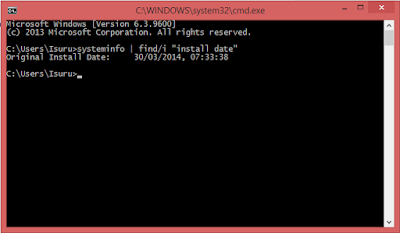
How to check system installation date in Windows computer?

Image
If you want to check windows installation date, go to command prompt and type the following command. systeminfo | find/i "install date" And you will get something like this.

How use getContentResolver in a class without activity?

In android development, methods like getContentResolver() need context to call these kinds of methods. But some classes does not have  Context. In those cases it is used like this. Application: getApplicationContext()  Activity: this (as Activity extends Context)  Fragment: getActivity()